Step 2: Select an Example App
Browse the App Store and pick a starter template. A good starting point is the Basic Chat App, which provides a simple conversational AI agent.
The Official group covers a range of common task categories - chat interfaces, document processing, web research, and email handling.
Start from a Template in Studio
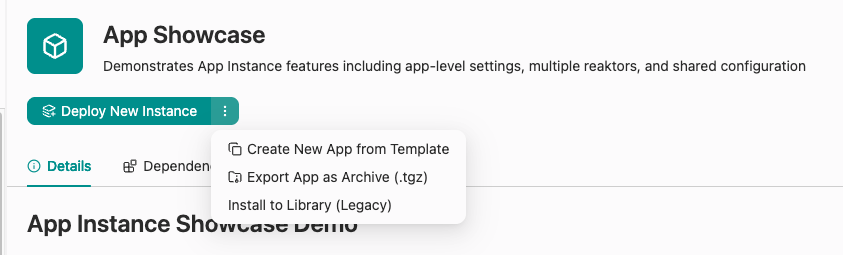
Select the App, then open the dropdown next to Deploy New Instance and choose Create New App from Template.
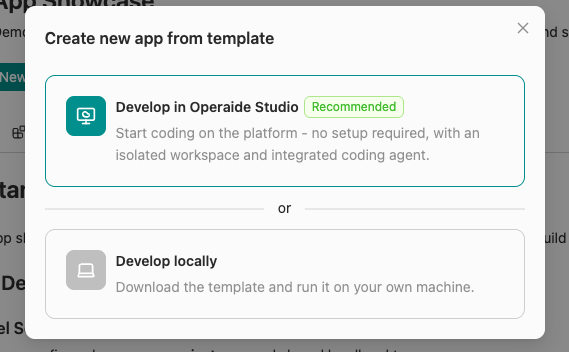
Choose Develop in Operaide Studio (recommended). The App is downloaded and set up in an isolated Studio workspace automatically - no local setup needed. (Choose Develop locally instead to download the template and run it on your own machine.)
A dialog appears prompting you to name your App. The name is built from the fixed operaide-app- prefix, your company identifier, and an App name.
Naming Guidelines
- Only lowercase letters, numbers, and hyphens are allowed
- Choose a descriptive App name that reflects its purpose
- The name must be unique within your organization
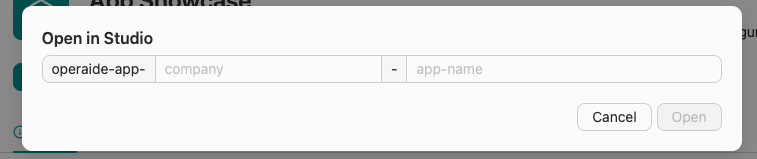
Enter your name and click Open. A new browser tab opens with Operaide Studio, ready for development.