Connection Management
Connections provide centralized, secure management of credentials and configuration for external services. Instead of scattering API keys across environment variables or hard-coding them into reaktor code, you define connections once in the platform and reference them by name wherever they are needed.
You manage connections from Connections in the sidebar.
Overview
The Connection Management page lets you:
- Store API keys, endpoints, and other credentials for external services in a single place
- Choose from registered connection types — each with its own configuration schema and documentation
- Reference connections by type and name from within your reaktor code
- See at a glance whether a connection's configuration is still compatible with the current schema
- Search, edit, and delete connections with role-based access control
Managing Connections
Viewing Connections
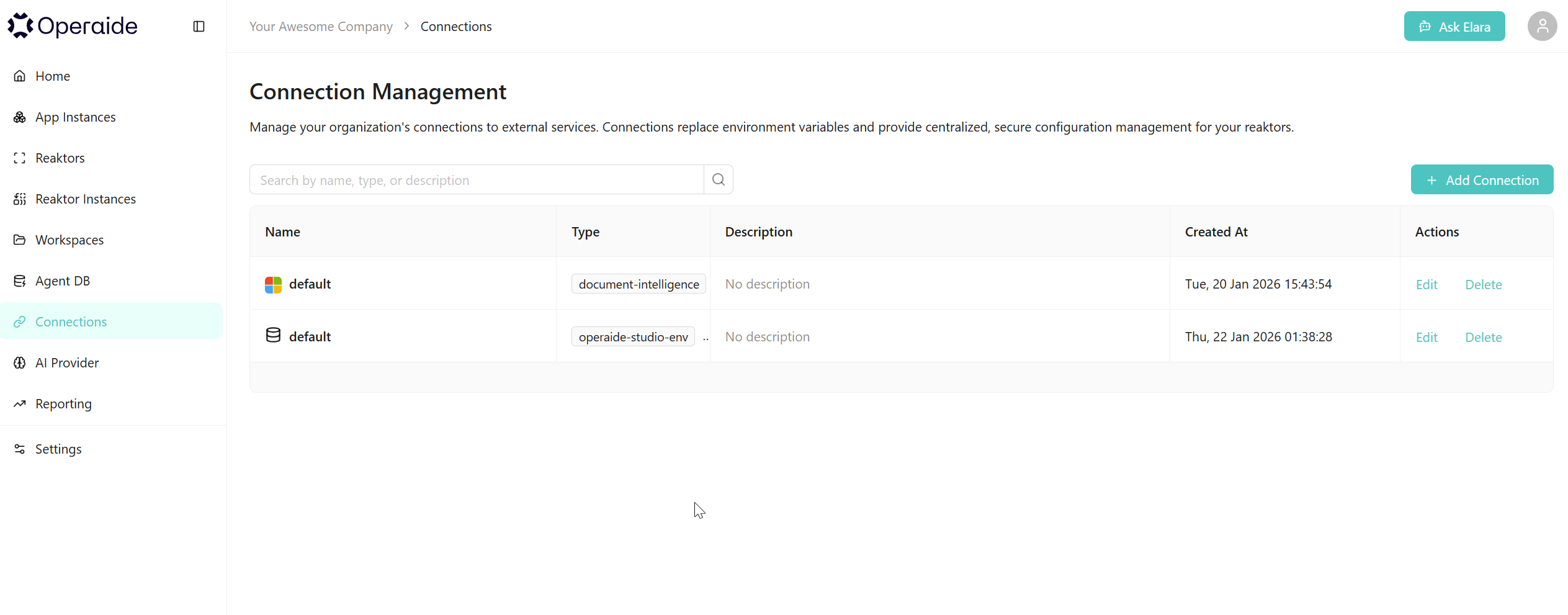
The connection list displays all connections for your organisation in a table with the following columns:
| Column | Description |
|---|---|
| Name | The connection name, preceded by the provider's icon. A warning or error indicator appears here if there are compatibility issues (see Schema Compatibility). |
| Type | A tag showing the connection type identifier (e.g. jina, mcp, document-intelligence). |
| Description | The optional description you provided, or "No description" if left empty. |
| Created At | Timestamp of when the connection was created. |
| Actions | Edit and Delete links (visibility depends on your permissions). |
Use the search bar at the top to filter connections by name, type, or description.
Creating a Connection
- Click + Add Connection (top-right).
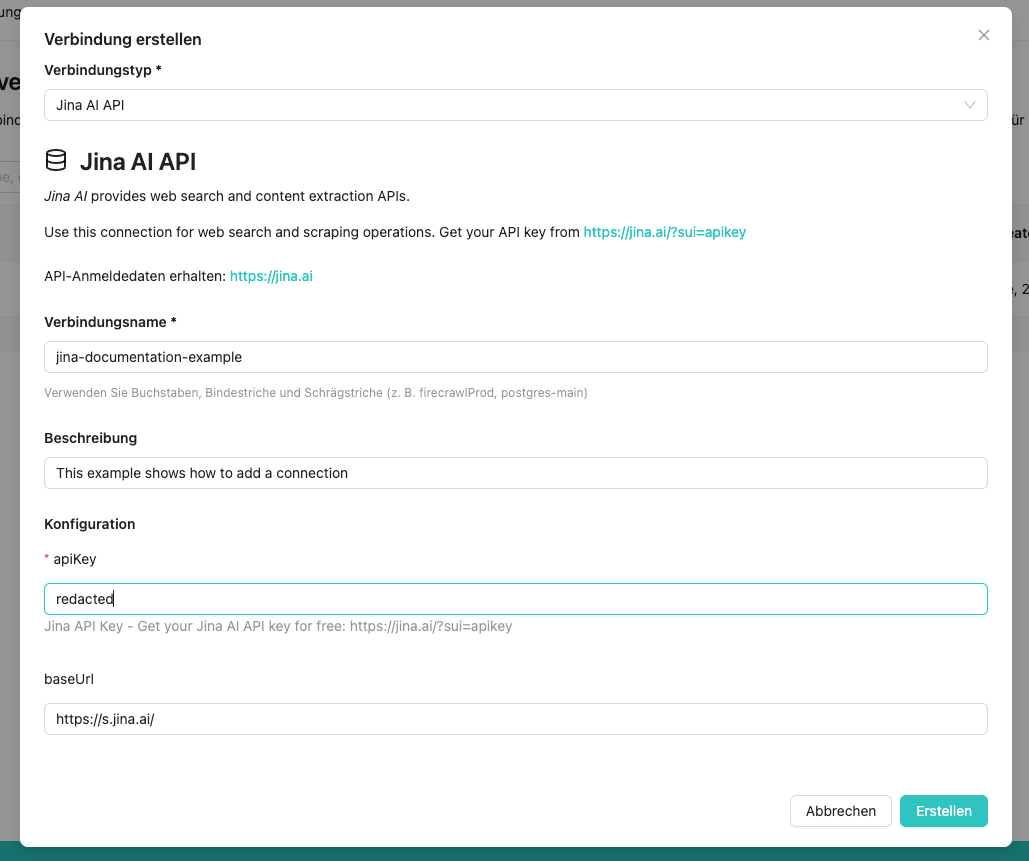
- In the Create Connection modal, fill in the following fields:
| Field | Description |
|---|---|
| Connection Type | Select the type of service you want to connect to. The dropdown lists all connection types registered by your installed apps. |
| Connection Name | A unique identifier for this connection. Use word characters, hyphens, and forward slashes only (e.g. jinaProd, postgres-main, api/primary). |
| Description | An optional human-readable description of the connection's purpose. |
| Configuration | A dynamic form generated from the connection type's schema. The fields depend on the selected type (e.g. API key, base URL, transport settings). |
-
After selecting a connection type, the modal displays:
- A description of the service with its provider icon
- A link to the credential portal where you can obtain the required API key or credentials
- The configuration form with type-specific fields
-
Click Create to save the connection.
Some connection types define a default name with special meaning. For example, using default as the connection name allows reaktors to find the connection automatically without explicit configuration. Check the connection type description for guidance.
Editing a Connection
Click Edit on an existing connection to open the edit modal. The Connection Type and Connection Name are locked — only the Description and Configuration fields can be modified.
If the connection type is no longer registered (e.g. because the app that provided it was uninstalled), the form falls back to the schema that was stored at creation time. A warning banner informs you that the type is not currently registered.
Deleting a Connection
Click Delete on an existing connection. A confirmation dialog ensures you do not accidentally remove a connection that may be in use by running reaktors.
Deleting a connection that is referenced by active reaktors will cause those reaktors to fail when they attempt to use it. Verify that no reaktors depend on the connection before deleting.
Trust and Governance
The connection system is the part of Operaide that you, as an administrator, rely on when someone asks you "which external services does this deployment actually talk to, and who decided so?". The answer should be: the list of configured connections on this instance, scoped to the right organization. This section explains what the connection system does to make that answer hold, what it deliberately does not try to do, and how the trust picture fits into a realistic dev/prod deployment topology.
What the connection system provides
Six properties follow from how connections are implemented, and each one is something an administrator can rely on:
- No hardcoded credentials in code or environment variables. Apps declare which connection type they need; the concrete credentials are configured once in the admin UI by the appropriate role. Nothing sensitive lives in source control, in
.envfiles, or in container environment variables. - Schema validation at both configuration time and runtime. Each connection type is backed by a typed schema. When a connection is created or edited, the schema validates the configuration before it is stored. When an aktor actually tries to use a connection at runtime, the same schema is re-checked; if the stored data is no longer compatible with the current schema, the workflow fails with a
connection-schema-incompatibleerror instead of silently consuming corrupt data. Misconfiguration is caught at the point it matters, not three steps downstream. - Visible change management when schemas drift or apps go away. When an app is updated and the new connection-type schema is no longer compatible with stored data, or when the app that defines a connection type is uninstalled altogether, the affected connections do not silently break. They are flagged in the connection list with visual indicators so an administrator can decide what to do — update the configuration to match the new schema, or delete the orphaned connection. The exact indicators are described under Schema Compatibility below.
- Query-level organization scoping. Every connection lookup on the server filters by
organizationInfo._id = user.currentOrganization._id. For a user who belongs to a single organization this is a hard boundary — no cross-organization access is possible through normal application paths. Administrators who are allowed to switch their active organization (for example, members of an Application Owner Org, or aSuperAdmin) can work in another organization's context and, when they do, see that organization's connections — that is the point of the pattern, not a loophole. Central multi-tenant administration is organization-administration territory, covered in its own chapters. - Server-side permission enforcement on every service call. The read, write, and delete paths in the connection service each begin with an explicit authorization check. These are not UI visibility hints — a user without the relevant permission cannot retrieve connection data, even by calling the underlying server method directly from a browser console.
- User attribution on creation. Every connection records the user who created it, so the "who added this external dependency and when" question has a concrete answer for audit reviews.
The practical enumeration property that follows from all of this: to enumerate the external data flows of an Operaide deployment, you list the configured connections of each organization. That list is the authoritative catalog — provided the apps you run follow the connection system, which the reference apps and the platform's documented patterns do.
What it does not prevent, and why that is fine
The connection system deliberately does not try to hide credentials from the role that writes aktor code. Inside a single organization, a user with the App Developer role is trusted with the credentials of that organization, because an aktor is code that runs with those credentials at runtime. "Reading a credential" and "writing a line of code that uses a credential" are functionally the same action: once an aktor can call getConnection(...) to perform its work, the code that does so can also log the value, send it to an external endpoint, store it in an app database, or pass it to another aktor. Trying to pretend otherwise would be security theater and would break the developer workflow without actually protecting anything.
The security boundaries that matter, and that the platform enforces in a meaningful way, are:
- Who can configure credentials — only the
CredentialManagerrole. This is the point at which secrets enter the system. A casual user cannot add a new external connection by accident. - Who can install and enable apps — the
AppManagerrole. This is the point at which new code paths that consume existing credentials are introduced. A casual user cannot deploy an aktor that starts calling an external service. - Which organization a user is currently acting in — enforced by the query-level scoping above, and by the restricted
permToSetCurrentOrganizationpermission that controls who can switch organizations at all.
These three boundaries are what an administrator should think about when mapping Operaide roles onto their own compliance requirements. "Can App Developers read credentials?" is not a useful question to optimize for; "Who can configure new credentials, who can install new apps, and who can switch between organizational contexts?" are the useful questions.
Separating development from production
Operaide supports the classical pattern that most developer-facing platforms follow: development happens in one place, production runs in another, and there is an explicit promotion step between them. The connection system is part of why this pattern works cleanly.
The strongest separation is by instance. A development instance is a single Docker container that an operator sets up specifically for development work. It has its own users, its own organization structure, and its own set of connections configured against test or sandbox credentials — never production data. Developers hold the App Developer role on this instance. A production instance is a separate deployment with its own user base, its own CredentialManager who configures the real credentials, and its own AppManager who installs the apps that should run. A developer who wrote an app does not have a login on the production instance and cannot read or change the production credentials, because they do not have a role there at all.
A lighter alternative is separation by organization inside a single instance. Operaide is multi-tenant by default; a development team can work in a dedicated "development" organization within the same instance that hosts the production organizations. Because connection queries are org-scoped, a developer in the development organization cannot see or use the connections configured for a production organization, even though both organizations share the same Operaide installation. This is a reasonable choice when a separate dev instance is not worth the operational overhead.
The promotion step between dev and prod is package publication. Operaide applications are npm packages; Operaide ships with its own built-in npm registry, but an operator can equally well publish to the public npm registry, to a privately hosted registry (Verdaccio, Artifactory, a GitLab package registry, and so on), or to whatever other npm-compatible registry the organization already uses for other software. The operator picks. On the production instance, the AppManager installs the published package from the registry and the CredentialManager configures the production credentials separately — the person who wrote the code and the person who supplies the real credentials are different people (or at least separate responsibilities inside the same team), which is exactly the separation of duties that compliance regimes expect for secret handling.
The full developer-facing workflow (how a developer iterates against a dev instance, how package publication works in practice, how an installed app is configured on arrival in production) belongs in the developer documentation and in the App Management chapter. The point for an administrator reading this chapter is that the connection system and the dev/prod topology are designed to fit together, and neither one does the full job alone.
Roadmap
A free Community Edition Docker image is planned for developer use, with built-in restrictions (smaller user limits, reduced resource footprint) that make it easy to stand up a dedicated development instance alongside a production deployment. The Community Edition is not shipping today.
Two additional changes to the connection system itself are planned and worth being aware of, because they will refine the trust picture described above without changing its direction:
- Per-app connection instances. It is worth distinguishing two concepts that are easy to conflate. A connection type is the schema definition for "what does a Jina connection look like, what fields does it need" — types are registered by apps and can be shared between apps cleanly today by putting the type registration into a shared library that each app depends on (the
op-demo-hello-world-libreference example shows the library pattern). A connection instance is the concrete configured connection with the actual API key — instances are currently created at the organization level, in a single org-wide list, regardless of which app prompted them. With a small number of apps that is fine; with many apps the list grows long and lacks any natural "this connection belongs to this app" structure. A future release will let an administrator create connection instances per app, so each app's connections live with that app instead of accumulating in one shared bucket. Sharing across apps stays possible but becomes an explicit choice. - Unified handling of AI providers. AI providers are currently configured through a separate mechanism from ordinary connections. A future release may bring them into the connection system so that every external integration, including AI provider endpoints, is visible in one place.
Both changes are still in planning and are not part of the current release.
Connection Types
Connection types are registered by installed apps, not hard-coded into the platform. When you install or deploy a reaktor app, it can register one or more connection types with the platform. This means the available types depend on which apps your organisation has deployed.
Examples of connection types you may encounter:
| Type | Label | Typical use case | Guide |
|---|---|---|---|
jina | Jina AI API | Web search and content extraction | Jina AI |
mcp | MCP Server | Model Context Protocol integration for external tools | |
database | Database Connection | PostgreSQL, MySQL, MongoDB, Redis, Elasticsearch | |
document-intelligence | Azure Document Intelligence | PDF-to-Markdown conversion via Azure | Document Intelligence |
operaide-studio-env | Operaide Studio Environment | Environment variables for processes within IDE | |
aktor-run-tracing | Reaktor Run Tracing Configuration | Debug data size control for reaktor runs |
Each connection type defines:
- A configuration schema (what fields are required and how they are validated)
- A UI schema (how the form is rendered — text inputs, text areas, file uploads)
- Optional credential portal URL (a direct link to where you can obtain API keys)
- Optional provider icon and description (shown in the create/edit modal)
Schema Compatibility
Because connection types are defined by apps, the schema for a connection type can change when an app is updated. Operaide tracks compatibility between the stored connection data and the current schema. Two indicators may appear next to a connection's name in the list:
| Indicator | Meaning |
|---|---|
| Warning (yellow icon) | The connection type is not currently registered. The connection still works using the schema that was stored at creation time, but it may not be compatible with newer versions of the app. |
| Error (red icon) | The connection's stored data is incompatible with the current schema. The connection may not work correctly. Open the connection and update its configuration to match the new schema. |
Hover over the indicator to see a tooltip with more details. When editing a connection with schema issues, the form displays an alert banner listing the specific validation errors.
Example Walkthrough
For a step-by-step walkthrough of the full connection lifecycle - creating a connection, configuring its fields, and referencing it in Reaktor code - see the Jina AI guide.
Permissions
Access to Connection Management is controlled by the following permissions:
| Permission | Description | Default roles |
|---|---|---|
| View Connections | Retrieve the full connection configuration, including any stored credential values | App Developer, Credential Manager |
| Write Connections | Create and modify connections | Credential Manager |
| Delete Connections | Delete connections | Credential Manager |
The View Connections permission intentionally returns the full connection configuration — credentials included — to the requesting user. This is consistent with the trust model described in Trust and Governance above: within an organization, the App Developer role is trusted with the credentials of that organization because it writes the aktor code that uses them, and hiding credentials from the code that has to consume them would be security theater. The boundaries that do meaningful work are who can configure new credentials (Credential Manager only) and who can install new apps that use them (App Manager), not who can read the stored values.
Only users with the Credential Manager role can create, edit, or delete connections. If you need to add a new connection or change an existing one, contact the person in your organization who holds that role.