Aktor Framework
Reaktors and Aktors are the core building blocks of Operaide applications.
Reaktor
A Reaktor is a registered workflow — a blueprint that the platform can execute. Each Reaktor serves a specific purpose: one might handle conversations, another might process documents. Together, the Reaktors in your App form the automation surface.
Reaktors are registered using dedicated functions depending on their type. The aktor prop takes any Aktor — Function or Composition:
import { registerChatReaktorDefinition } from '@operaide/ai';
import { createAktorComposition, registerReaktorDefinition } from '@operaide/aktor';
import { z } from 'zod';

// Define the workflow as an AktorComposition
const aktorBasicChat = createAktorComposition('aktorBasicChat', ({ messages }) => {
    // → see the LLM Calls chapter for a complete example
});

// Chat-compatible Reaktor (for conversational interfaces)
registerChatReaktorDefinition({
    reaktorDefinitionId: 'basic-chat',
    label: 'Basic Chat',
    description: 'A simple chat assistant',
    aktor: aktorBasicChat,
});

// Define the workflow as an AktorComposition
const aktorDataProcessor = createAktorComposition('aktorDataProcessor', ({ data }) => {
    // → add your logic here and return the result
});

// General-purpose Reaktor
registerReaktorDefinition({
    reaktorDefinitionId: 'data-processor',
    label: 'Data Processing Workflow',
    inputSchema: z.object({ data: z.string() }),
    outputSchema: z.object({ result: z.string() }),
    aktor: aktorDataProcessor,
});
Aktor
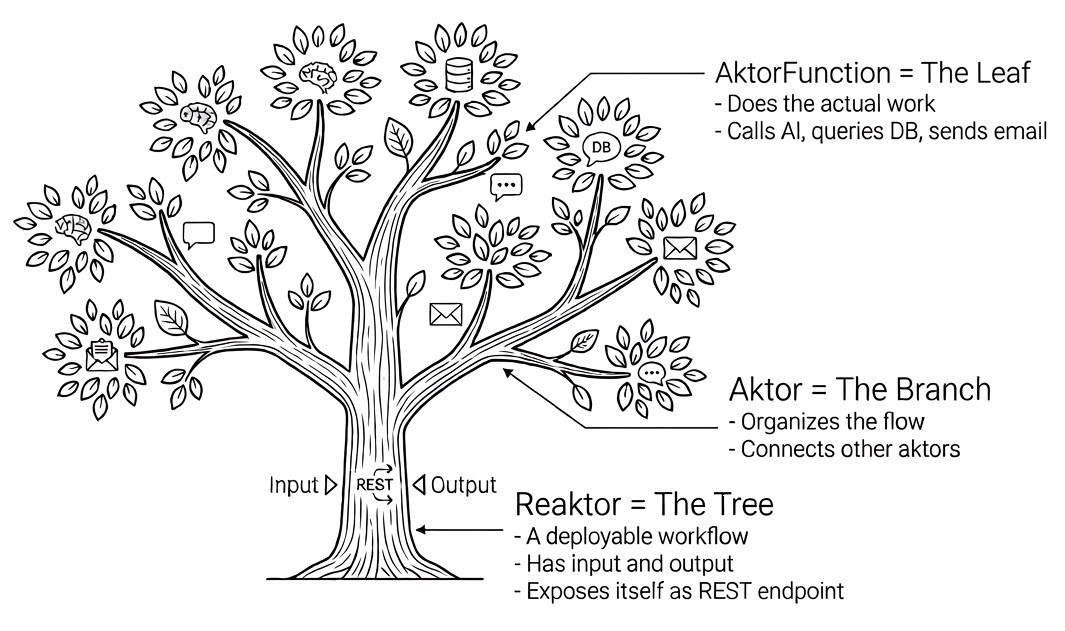
There are two kinds of Aktors:
- AktorFunction — does actual work (calls an API, transforms data, queries a database). Created with
createAktorFunction. - AktorComposition — connects Aktors into a reusable workflow. Created with
createAktorComposition.
From the outside, both look the same: inputs in, output out. Every building block in Operaide is an Aktor — Reaktors wrap an Aktor, Compositions connect Aktors, AktorFunctions do the work.
Key Characteristics
- Composition: Aktors form directed graphs with input dependencies and child Aktors.
- Execution: Each Aktor produces JSON-serializable values when evaluated by the engine.
- Monitoring: Aktor execution can be tracked and observed using the Reaktor-Trace system.
Wrapping plain values: aktorConst
Every input to an Aktor must itself be an Aktor — because the system builds a graph of lazy, composable nodes before executing anything. A plain string or number is not an Aktor.
aktorConst is the simplest solution: it wraps any static value into an Aktor that always returns that value.
import { aktorConst } from '@operaide/aktor';

const greeting = aktorConst('Hello, world!');  // Aktor<string>
const maxRetries = aktorConst(3);              // Aktor<number>
const config = aktorConst({ timeout: 5000 }); // Aktor<{ timeout: number }>
You will see aktorConst in nearly every Operaide code example. Whenever a function expects an Aktor<T> and you want to pass a fixed value, wrap it with aktorConst.
Platform base URL: aktorBaseUrl
aktorBaseUrl returns the platform's base URL (without trailing slash). Use it whenever you need to construct URLs pointing back to the platform — for example, file links, callback URLs, or REST calls to other Reaktors.
import { aktorBaseUrl } from '@operaide/aktor';

const baseUrl = aktorBaseUrl({});  // Aktor<string>, e.g. "https://app.operaide.ai"

// Use it to build file URLs in your own AktorFunction
const fileUrl = aktorBuildFileUrl({ baseUrl, databaseId, fileId });
For file download URLs specifically, use the platform's appFileUrl() helper
(see App Database Files) instead of
assembling the path yourself.
Prefer aktorBaseUrl over hardcoded URLs or aktorSetting for the base URL. It automatically resolves from the platform configuration.
Creating AktorCompositions
Use createAktorComposition when you need to connect multiple Aktors into a reusable workflow. Inside the callback, only the DSL is allowed: const assignments with aktorXxx() calls and a return statement:
import { createAktorComposition } from '@operaide/aktor';

const aktorDocumentChat = createAktorComposition('aktorDocumentChat',
    ({ content, system, documentGroupId }) => {
        // Compose other Aktors here and return the final Aktor
    }
);
Creating AktorFunctions
AktorFunctions are lightweight wrappers that turn plain TypeScript functions into Aktors. They do the actual work. createAktorFunction handles both sync and async functions:
import { createAktorFunction } from '@operaide/aktor';

// Synchronous
const aktorAddNumbers = createAktorFunction('aktorAddNumbers',
    (args: { x: number; y: number }) => args.x + args.y
);

// Asynchronous
const aktorFetchWeather = createAktorFunction('aktorFetchWeather',
    async (args: { city: string }) => {
        const response = await fetch(`/api/weather/${args.city}`);
        return response.json();
    }
);
Naming Convention
Aktor names follow the aktorXxxYyy pattern:
// ✅ Correct
export const aktorCalculateShipping = createAktorFunction(...);
export const aktorValidatePostalCode = createAktorFunction(...);

// ❌ Avoid
export const calculateShipping = createAktorFunction(...);
Execution Model
The platform evaluates the Aktor graph — resolving dependencies, running independent branches in parallel, executing AktorFunctions, and returning final values. This creates a clear, traceable execution that the Reaktor-Trace system can monitor.
Aktor Library
Operaide maintains a stable library of reusable, backward-compatible Aktors for common operational patterns, available via the @operaide/* packages:
| Package | Purpose |
|---|---|
@operaide/aktor | Core Aktor functions, composition, control flow |
@operaide/ai | LLM calls, prompt functions, chat Reaktors |
@operaide/vector | Vector search and RAG operations |
@operaide/database | Type-safe SQL and file operations |
@operaide/document | PDF processing, web scraping |
@operaide/mail | Email sending and processing |
Composition Primitives
The @operaide/aktor package provides built-in primitives for control flow and data processing. Most composition primitives take a single object with named fields:
| Primitive | Signature | Purpose |
|---|---|---|
aktorIfElse | ({ if_, then_, else_ }) | Conditional branching |
aktorIf | ({ if_, then_ }) | Conditional without else |
aktorDoWhile | ({ do_, while_ }) | Loop with post-condition |
aktorParallel | ({ items }) | Execute Aktors concurrently |
aktorFilter | ({ items, predicate }) | Filter Aktors by predicate |
aktorFind | ({ items, predicate }) | Find first matching Aktor |
aktorSome | ({ items }) | True if any Aktor is truthy |
aktorForEachStream | ({ items }) | Stream items from array Aktor |
aktorReturnWith | ({ result, ...deps }) | Return with side-effect deps |
aktorDefault | (aktor, fallback) | Fallback on null/undefined |
aktorConst | (value) | Wrap a static value |
aktorSetting | (schema, default) | Runtime configuration |
Reaktor Diagram
A Reaktor diagram is a visual map of your App. It shows all the different elements — your Reaktors, Aktors, databases, and APIs — and how they connect. It is generated automatically from your code.
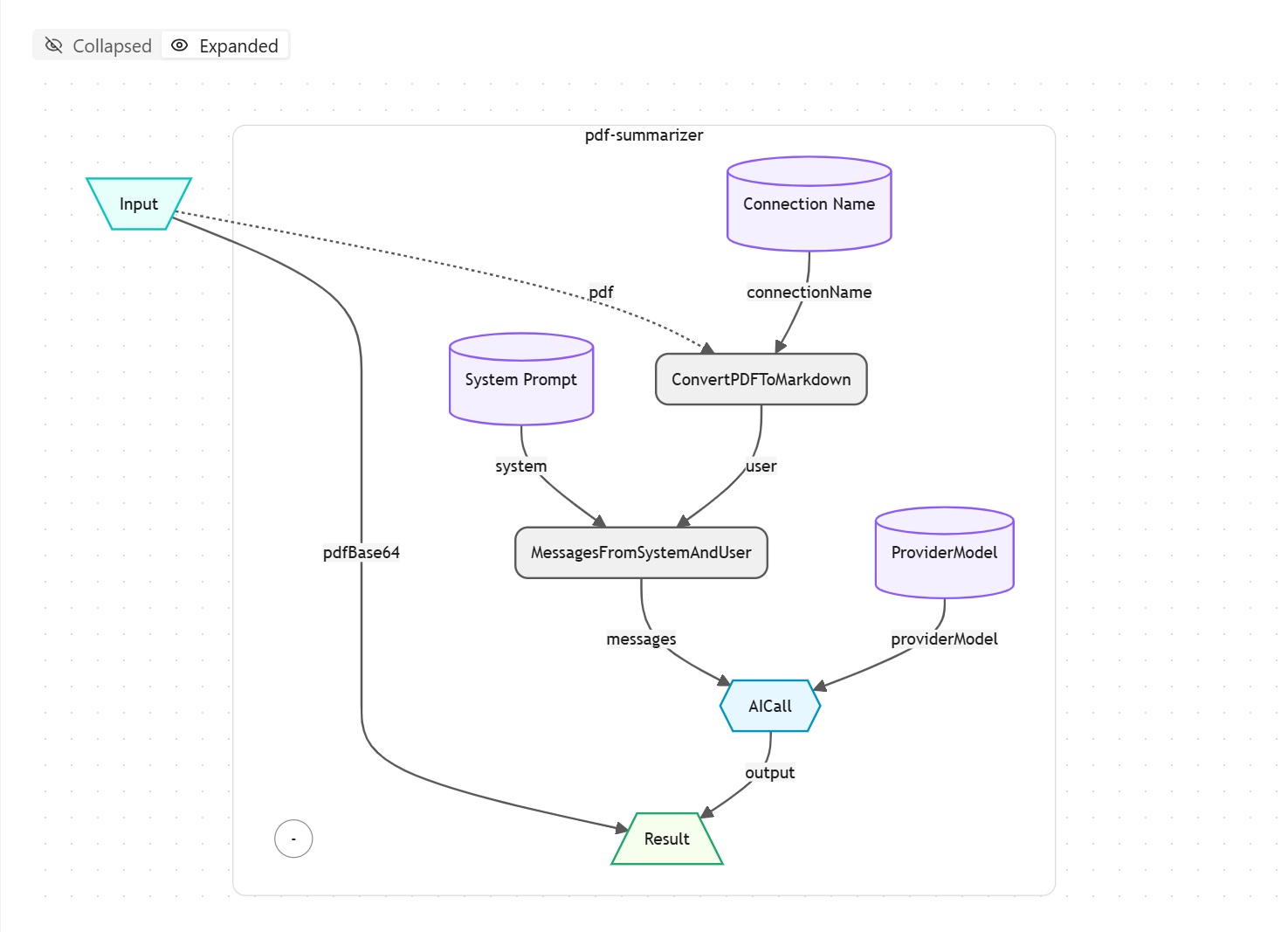
The diagram is also interactive: you can step through a recorded run on it, or follow a live one. See Reaktor Trace Walk.